Start freeStart

AI interior design in your browser Your room, reimagined.

Take a photo, pick a style - the AI room planner shows you in seconds how your room, exterior, yard or balcony could look. And if only the sofa bothers you, just paint over exactly that.

3 free designs a day Runs in your browser - no app store No subscription, no auto-renewal
After: the same living room in Japandi style with wood, linen and a paper lantern
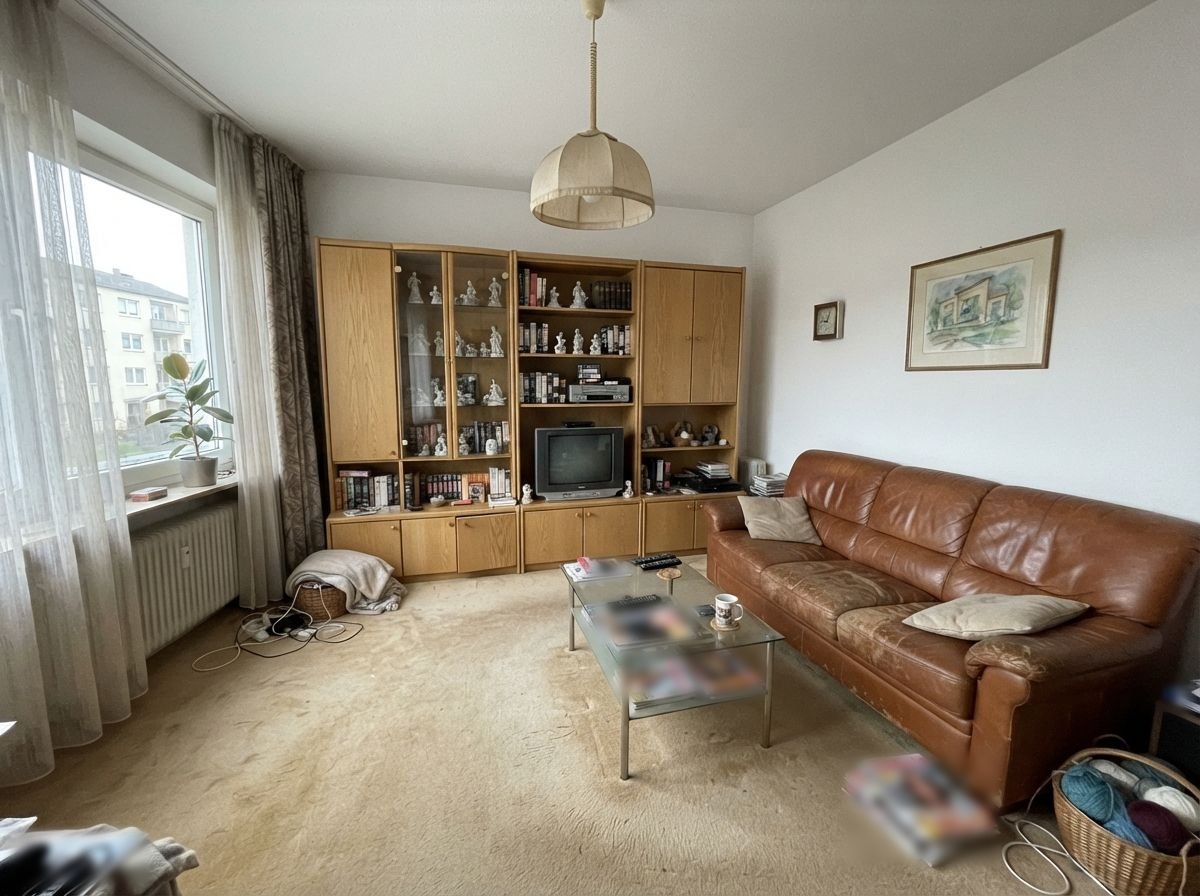
Before: living room before the redesign
BeforeAfter
Drag the slider: living room in Japandi style - example image, created with AI.

NextLook as an app on your phone

One tap on the icon - and you start designing right away, full screen.

Open the browser menu ⋮ and choose "Install app" or "Add to Home screen".

Tap Share at the bottom, then "Add to Home Screen".

AI interior design, indoors and out

NextLook designs more than rooms. Pick the space in the app - styles and suggestions adapt, whether living room, exterior wall, balcony or pool.

After: the same bedroom in Scandinavian style with light wood, white and plants
Before: plain, older bedroom
BeforeAfter

Interior

Living room, bedroom, kitchen, bathroom, home office and many more: new furniture, colors, floors and lighting - walls and windows stay where they are.

Example: bedroom in Scandinavian style - example image, created with AI.

Design an interior →
After: the same single-family home, modern, with light stucco, dark windows and wood at the entrance
Before: 1970s single-family home with weathered stucco
BeforeAfter

Exterior

What would the house look like with a new color, different siding, wood accents or new windows? Shape, roof and window positions stay the same.

Example: 1970s house in Modern style - example image, created with AI.

Design an exterior →
After: the same yard, Mediterranean, with terracotta, gravel, an olive tree and lavender
Before: neglected yard with patchy lawn
BeforeAfter

Yard

Garden beds, paths, lawn, seating area and plantings: a bare lawn becomes a yard you love to sit in.

Example: yard in Mediterranean style - example image, created with AI.

Design a yard →
After: the same balcony in boho style with rattan, cushions, string lights and plants
Before: empty, plain balcony
BeforeAfter

Patio & Balcony

Flooring, furniture, privacy screening, plants and lighting: a few square feet outdoors become a favorite spot.

Example: balcony in Boho style - example image, created with AI.

Design a patio or balcony →

New: Pool

Add a pool, refresh an old one or go straight to a swim pond? Tap an idea - the example shows you before and after. Drag the slider to compare.

After: the same yard with a new pool and lounge area
Before: yard with lawn before the remodel
BeforeAfter

Add a pool

A lawn or yard becomes a yard with a pool - including coping and lounge area.

Example in Modern style - example image, created with AI.

Try it with your photo →

Which rooms can I design with AI?

Tap a room - the app opens with the matching room type. The AI furnishes it so that it really works for its purpose.

Living roomSofa, coffee table, lighting that feels like homeHome BedroomBed, nightstands, calm colorsHome KitchenCabinets, countertops and lighting, rethoughtHome Dining roomDining table, chairs and the light aboveHome BathroomMirror, shelves and fresh lightingHome EntrywayCoat hooks, shoe storage, a friendly welcomeHome Kids roomBed, play corner and storage - kid-friendlyHome Guest roomComfortable bed, surface space, room for luggageHome Studio apartmentLiving, sleeping, cooking in a small spaceHome Walk-in closetClosets, hanging rods, mirrorHome Home officeDesk, good lighting, quiet for video callsWork Small officeCompact workspace for 1-3 peopleWork Art studioEasel, large worktable, plenty of lightWork Home gymEquipment, gym flooring, large mirrorSpecial rooms Gaming roomSetup, gaming chair, LED lightingSpecial rooms Music roomInstruments, acoustic panels, warm lightingSpecial rooms BasementBright and inviting despite little daylightSpecial rooms RestaurantGuest tables, bar, atmospheric lightingCommercial · Business CafeCounter, cozy seating nooks, warm lightingCommercial · Business Hotel roomComfortable bed, desk, hotel charmCommercial · Business Shop / BoutiqueShelving, product display, inviting entranceCommercial · Business Hair salonStyling stations, large mirrors, bright lightingCommercial · Business Beauty studioTreatment bed, magnifier lamp, hygienically brightCommercial · Business Waiting roomComfortable seating, calm colors, friendly receptionCommercial · Business AirbnbGuest-ready, easy to maintain, photogenic for the listingCommercial · Business Real estate saleHome staging: neutral, bright, ready for the listingCommercial · Business Car dealershipShowroom with display floor and consultation deskCommercial · Business Vehicle adsVehicle photo in the showroom, interior that looks freshly detailedCommercial · Business Wrap & PaintColor and wrap preview - a visualization, not the actual conditionCommercial · Business Event venueBanquet, stage, bar and atmospheric lightingCommercial · Business Look & StyleHairstyles, glasses, makeup, outfit and color advice - tried on you, also as a grid HairstylesA new hairstyle or hair color on your photo - compare before and after GlassesTry on frames - even nine models at once SunglassesTry sunglasses shapes on your face MakeupFrom subtle to festive - see makeup looks on you OutfitsTry clothing styles on you, from everyday to special occasions Style adviceWhich style suits you? Compare several directions Color adviceWhich colors suit you? Color types on your photo AccessoriesTry jewelry, hats and scarves on you

Commercial rooms are only available with NextLook Business - 2K, no watermark and commercial usage rights for your website, listing sheet, ads or menu.

California (AB 723): digitally altered listing photos must be disclosed, and the original must be accessible. NextLook keeps your original and labels results as visualizations. This is not legal advice.

What makes NextLook different

Many AI apps just roll the dice and hand you a new room. NextLook lets you have a say - down to the detail.

Brush for selected areas Plus

Paint with your finger just the spot that should change - the sofa, the wall, the floor. Everything else stays exactly as it is. With NextLook Plus or Business.

Style from a reference photo

The hotel room from your vacation, a picture from a catalog? Upload it as a reference - colors, materials and mood move into your room.

Fits your budget

Small, medium or large budget: suggestions follow what you really want to spend - from thrift-store finds to designer pieces.

Your wishes in your own words

"More plants," "the bed stays by the window," "please in sage green" - write down what matters to you and the AI takes it into account.

Keep building on the result

Almost perfect? Keep designing right on the result - new furniture first, then a different wall color. Step by step instead of starting over every time.

Before/after slider

Drag the slider across the image and see exactly what changed. Like it? Save it or share it with one tap.

How to redesign your room with AI

No software, no experience needed. A phone photo is enough.

  1. Take a photo

    Photograph your room - ideally in daylight from a corner. Or pick an image from your gallery.

  2. Choose a style and your wishes

    Pick a style - there are separate ones for living spaces, exteriors, yards, patios and pools -, set your budget and write down what matters to you.

  3. Compare & keep going

    After a few seconds you see your result - to compare, save, share or keep editing.

Six tools in the AI room planner

For interiors, exteriors, yards and patios & balconies.

Redecorate

New furniture, decor and colors in the chosen style - windows, doors and walls stay where they are.

Furnish an empty room

Ideal for new construction, a move or a listing: the AI furnishes the empty room convincingly.

Declutter & empty

Furniture and clutter disappear - so you see how much space there really is.

Renovate

New floor, walls, ceiling and lighting - your furniture stays in place.

Edit selected area Plus

Only the painted spot is redesigned - the rest of the photo stays untouched. With Plus or Business.

Transfer a style

Apply the look of a reference photo to your room.

16 decor styles to try

Tap a style and you start with it right away. For exteriors, yards, patios and pools the app shows its own matching styles such as cottage garden, Japanese garden or luxury villa - and for commercial rooms like restaurant, cafe, hotel room, shop, salon, car dealership or event venue its own styles such as premium, urban jungle or dark & warm. For vehicle ads there are backdrops like showroom, photo studio or city at night, plus interior detailing.

Start free, fair and no subscription trap

Start free. Plus only if you want more - it ends automatically, nothing renews behind your back.

Free
$0 / with an account
  • 3 designs per day
  • 1K resolution
  • With watermark
  • Home, work and special rooms
  • Outdoors: exterior, yard, patio, balcony & pool
Start free
Plus 30 days
$6.99 / 30 days
  • 200 designs for 30 days
  • No watermark
  • 1K resolution
  • Brush, select and voice commands
  • Home, work and special rooms
  • Outdoors: exterior, yard, patio, balcony & pool
  • For personal use
  • No subscription - ends automatically
Choose Plus 30 days
Best value Plus 365 days
$59.00 / 365 days

≈ $4.92 per month

  • 2,400 designs for 365 days
  • No watermark
  • 1K resolution
  • Brush, select and voice commands
  • Home, work and special rooms
  • Outdoors: exterior, yard, patio, balcony & pool
  • For personal use
  • No subscription - ends automatically
Choose Plus 365 days

Good to know: Unused designs expire when the term ends. If you renew before it expires, your remainder is kept and the new credit is added. No subscription: Plus ends automatically, nothing is charged.

Prices in USD. Prepaid, no subscription. Pay with PayPal.

For businesses and pros

NextLook Business

For restaurants, hotels, vacation rentals, retail, salons, beauty studios, real estate agents, car dealers and event venues: images for your website, listing sheet, ad, social media or menu - with commercial usage rights. For car dealers: vehicle ads - an ordinary vehicle photo becomes a showroom image, and the interior looks as if it had been professionally detailed.

Business 30 days
$29.00 / 30 days
  • 300 designs for 30 days
  • Commercial usage rights
  • All rooms including commercial
  • Listing sheet generator for real estate (PDF)
  • Vehicle generators: design, condition report, sales offer
  • Look & Style: hairstyle, glasses, outfit
  • 2K resolution
  • Brush, select and voice commands
  • No watermark
  • No subscription - ends automatically
Choose Business 30 days
Best value Business 365 days
$290.00 / 365 days

≈ $24.17 per month

  • 3,600 designs for 365 days
  • Commercial usage rights
  • All rooms including commercial
  • Listing sheet generator for real estate (PDF)
  • Vehicle generators: design, condition report, sales offer
  • Look & Style: hairstyle, glasses, outfit
  • 2K resolution
  • Brush, select and voice commands
  • No watermark
  • No subscription - ends automatically
Choose Business 365 days

Plus and Business compared

Which feature is in which plan?

FeaturePlusBusiness
Price for 30 days$6.99$29.00
Price for 365 days$59.00$290.00
Designs (30 / 365 days)200 / 2,400300 / 3,600
Resolution1K2K
Usepersonalcommercial, permanent
Rooms and spaces
Home, work and special rooms✓✓
Exterior, yard, patio, balcony and pool✓✓
Commercial rooms: restaurant, cafe, hotel, shop, salon, waiting room, event venue–✓
Real estate: home staging for the listing, vacation rental–✓
Vehicles: showroom, vehicle ads, wrap and paint–✓
Look & Style: hairstyle, glasses, makeup, outfit–✓
Tools
No watermark✓✓
Brush, select and voice commands✓✓
Listing sheet generator for real estate (PDF)–✓
Vehicle PDFs: design, condition report, sales offer–✓
PDFs with logo, QR code and brand color–✓
No subscription, ends automatically✓✓
Plus chooseBusiness choose

What is in Business

Everything in Plus - and in addition these rooms and tools that only Business has:

Commercial rooms

  • Restaurant and cafe
  • Hotel room and Airbnb
  • Shop / Boutique
  • Hair salon and beauty studio
  • Waiting room
  • Event venue

Real estate & vehicles

  • Real estate sale: home staging, neutral, bright, ready for the listing
  • Car dealership: showroom with display floor
  • Vehicle ads: vehicle photo in the showroom, interior that looks freshly detailed
  • Wrap & Paint: color and wrap preview

California (AB 723): digitally altered listing photos must be disclosed, and the original must be accessible. NextLook keeps your original and labels results as visualizations. This is not legal advice.

PDF generators

  • Real estate listing sheet with cover page, property details, gallery, floor plan, location and contact page (sample)
  • Vehicle design proposal (sample)
  • Vehicle condition report with signature fields (sample)
  • Vehicle sales offer (sample)
  • With your logo, QR code and brand color

Look & Style

  • Hairstyles and hair colors
  • Glasses and sunglasses
  • Makeup and outfits
  • Style and color advice
  • Accessories

For your publishing

  • Commercial usage rights - for your website, listing sheet, ads, social media or menu
  • Usable permanently, even after it expires
  • 2K resolution
  • No watermark

All tools from Plus

  • Brush for selected areas
  • Select and voice commands

All personal spaces

  • Home, work and special rooms
  • Exterior, yard, patio & balcony
  • Pool

Good to know: Business includes everything in Plus. Images from your Business term can be used commercially forever, even after it expires. Unused designs expire when the term ends. Commercial rooms are only available with Business. No subscription: Business ends automatically, nothing is charged.

Frequently asked questions about AI interior design

Is AI interior design free to use without signing up?

Yes. You get 3 free designs every day - no sign-up needed, in 1K with a watermark. More designs, no watermark and a brush for selected areas come with Plus - prepaid, no subscription, it ends automatically.

Is there an AI interior design app?

Yes, as a free web app: NextLook runs right in your browser on phone, tablet and computer. If you like, add it to your home screen with one tap - no app store needed.

Does the AI room planner replace an interior designer?

No. The images are ideas and suggestions for inspiration - not a blueprint and not professional design work. They help you compare styles, colors and furniture before you buy or remodel.

How is NextLook different from other AI room planners?

NextLook runs in your browser with nothing to install and designs indoors and out - rooms, exteriors, yards and balconies. A before/after slider shows the difference, and with Plus you change just selected areas with a brush.

What happens to my photos?

Your photos and results are stored privately in your account - only you can see them. To generate a design, the photo is sent to our AI provider. You can delete each design individually or your whole account including images. Details are in the Privacy Policy.

Are the images true to scale?

No. The images are AI visualizations for inspiration - not planning documents. Please check measurements, structure, electrical and building codes with a professional before you remodel.

What counts as a design?

Every finished image. If the AI cannot redesign a photo, the design is not counted.

How do I pay for Plus - and how do I cancel?

You pay once with PayPal in US dollars. It is prepaid, so there is no subscription. As soon as the payment arrives, we activate Plus and you get an email. There is nothing to cancel: Plus ends by itself after 30 or 365 days.

What happens to designs I do not use?

With Plus you get a fixed credit of designs for the term. Whatever you have not used by the end expires - it is not paid out and not carried over automatically. In your account you can always see how many designs you have left and until when.

Can I renew Plus?

Yes, any time in your account. If you renew before it expires, the new days are added at the end and the new credit is added to your remaining balance - nothing is lost. If you renew after it expires, a new term starts with fresh credit.

Can I use the images commercially?

With Business yes: images you create with Business can be used for your company - on your website, in listing sheets and ads, on social media or on your menu, even after the term ends. Free and Plus are meant for personal use, such as planning your home. Please label published images as AI visualizations. Details are in the Terms.

Can I use NextLook to stage real estate listing photos?

Yes, with Business. California (AB 723): digitally altered listing photos must be disclosed, and the original must be accessible. NextLook keeps your original and labels results as visualizations. This is not legal advice.

Does it work for yards, balconies, pools or house exteriors?

Yes. Just pick the space "Exterior", "Yard", "Patio & Balcony" or "Pool" - styles and tools adapt. For a pool you also choose what should happen: add a pool, modernize, swim pond, hot tub, lounge or indoor pool.

Which photos work best?

Bright photos in daylight, taken from a corner of the room so that as much of the room as possible is visible. Landscape orientation usually works better than portrait.

Ready for the before-and-after moment?

You get 3 free designs every day. An account with email is enough.

Redesign a room now